Open the program your CAM posted. Check it before you press Start.
Toolpath Viewer reads 3-axis router g-code, 4-axis hotwire XYUV and KUKA KRL straight from the file and draws it in 3D with the code beside it. No robot cell to model, no account, nothing sent anywhere.
Windows 10 and 11. The download gives you a free 30-day trial of Pro, no card needed. Public launch 26 October 2026.
It reads the file, not the extension
Two shops' .nc files can be completely different machines. Toolpath Viewer looks at the program itself and works out what it is.
( Sheet4 )
(VECTRIC POST REV.)
T8
G43H8
G90
S18000M3
G0X914.267Y930.525Z38.000
G1Z18.000F4000.0
(Begin Header section)
G21
G90
F200.0000
(param, AxisNames=XYUV)
(param, towerDistance=1392.0)
G1X0Y0U0V0
G1X33.2Y87.0U31.9V88.4
&ACCESS RVO1
DEF ROUGHING_A()
$BASE=EK(MACHINE_DEF[3].ROOT ...
$VEL.CP=0.167
LIN {X 1240.5, Y -312.0, Z 855.1,
     A 90, B 0, C 180, E2 45.0}
CIRC {X 20, Y 10, Z 0}, {X 30, Y 0, Z 0}
PTP {A1 0, A2 -90, A3 90, A4 0, ...}
3D-printer g-code from PrusaSlicer, Cura, Orca and Bambu Studio opens too, with layers and filament.
What you see
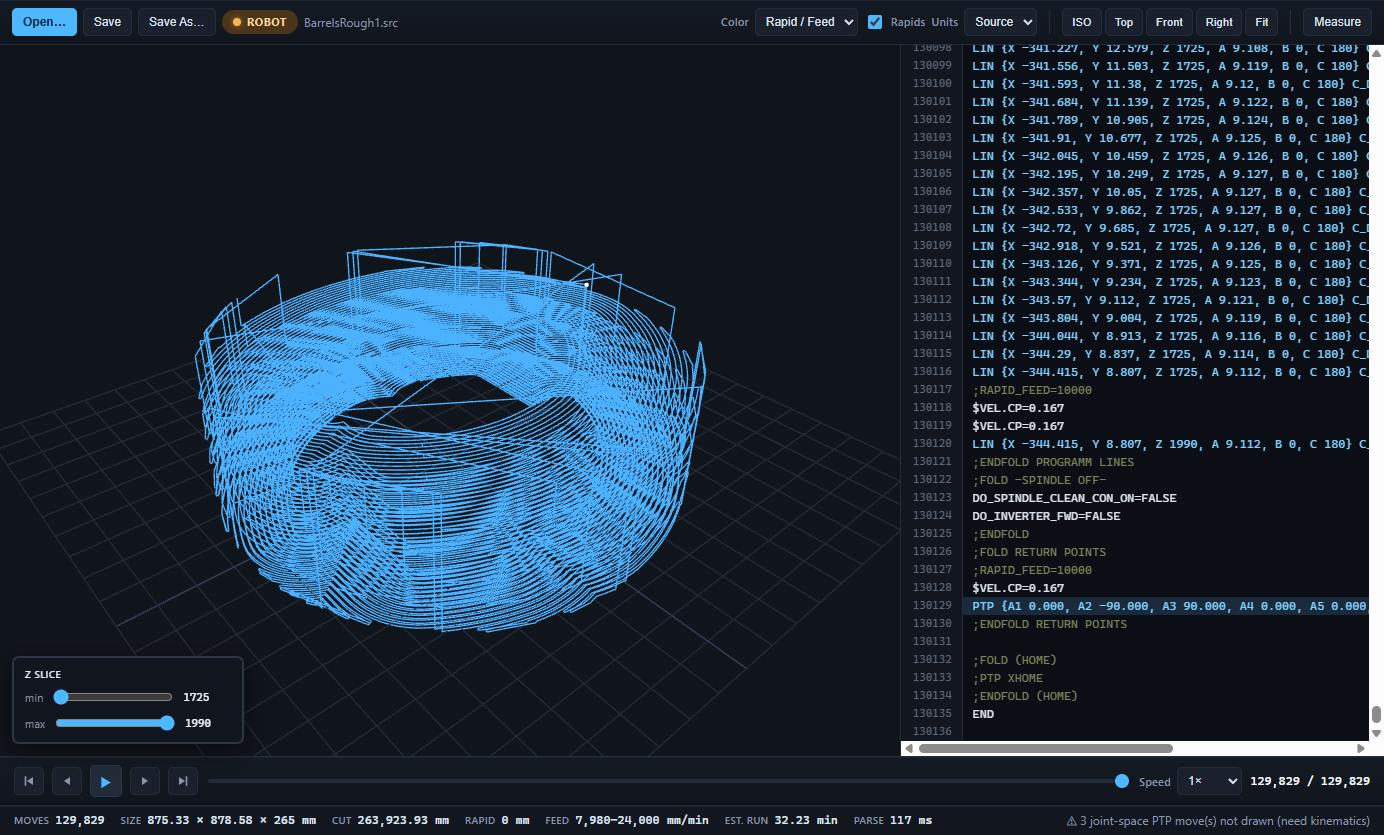
The whole path in 3D, coloured by what the machine is doing, with the code line for every move a click away.
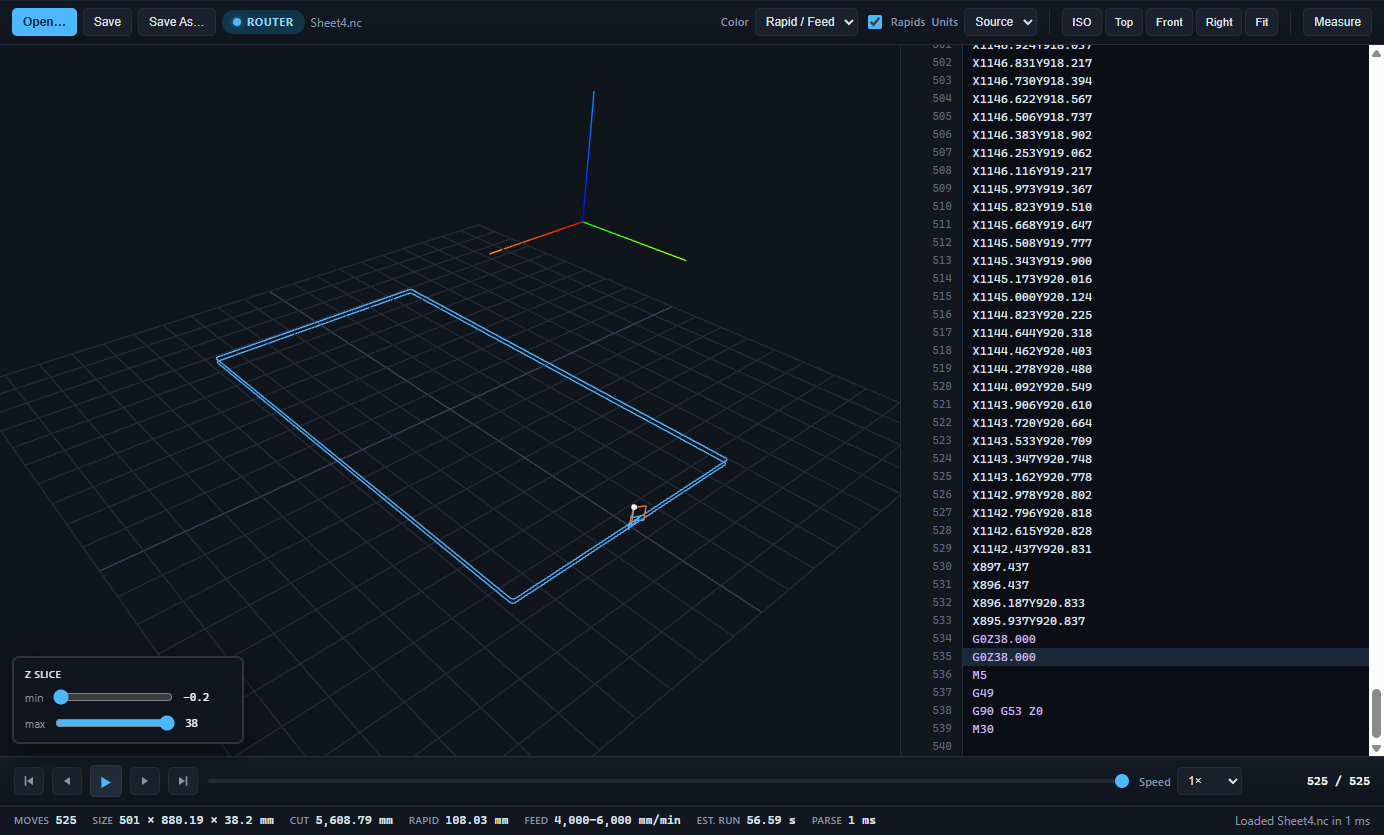
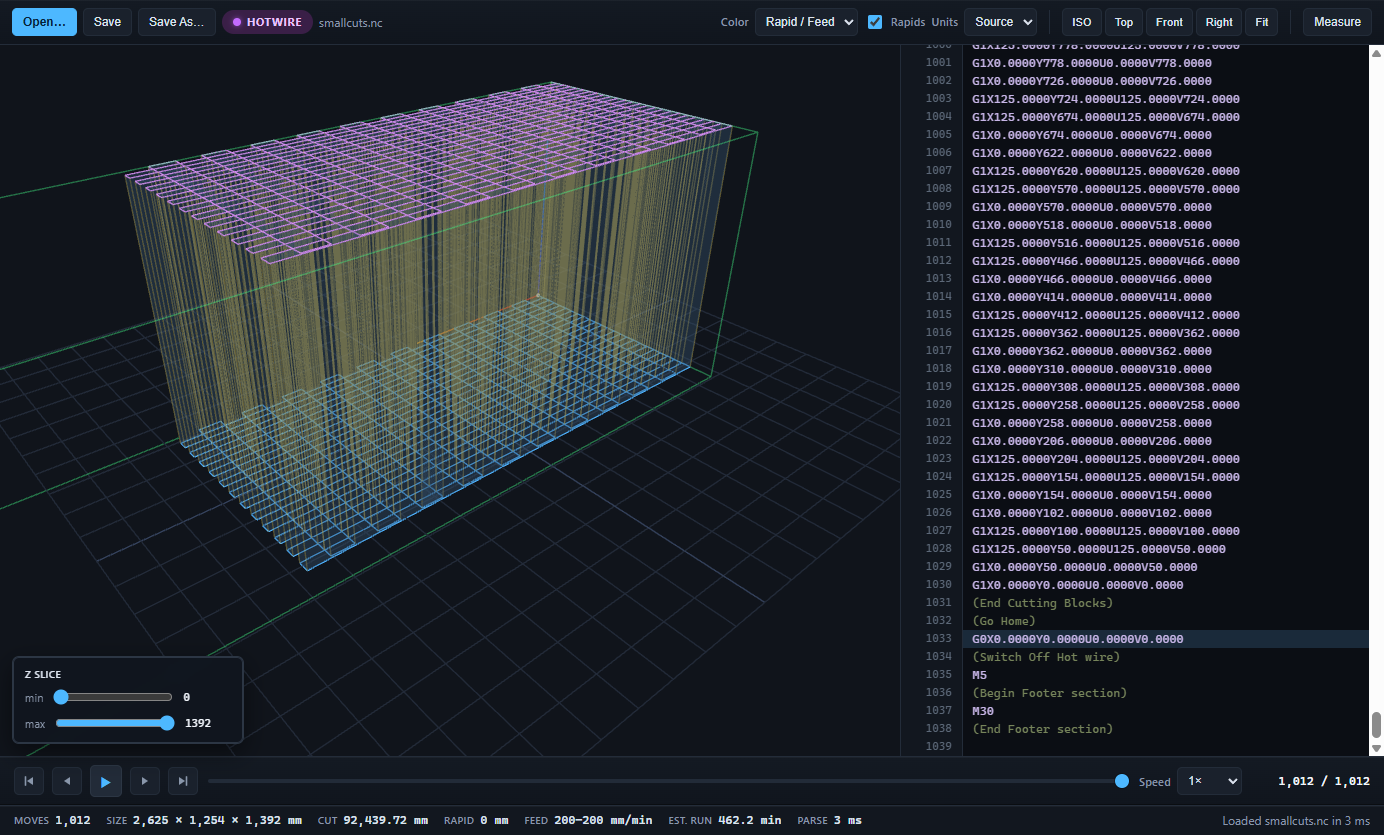
- Play it Scrub, step or play at up to 8× with a moving tip, and the code panel follows.
- Click a line, jump the path Click any line of code to see where that move is. Hover a move to read its line.
- Measure Two clicks give a distance and the X, Y, Z difference.
- Colour by height or feed Spot the one pass that is 2 mm low, or the block that runs at the wrong speed.
- Honest run time The estimate follows every velocity change in the program, including KUKA's $VEL.CP blocks.
- Edit and save in place Fix a value, watch the path update, save back to the same file with its encoding and line endings untouched.
- Big programs A 2-million-move program is on screen in about three seconds, and scrubbing stays smooth.
- Nothing leaves your PC No account, no telemetry, no internet needed. Your programs stay where they are.
Written on a shop floor, not in a software office
Toolpath Viewer comes from a CNC foam-cutting shop in Queensland that runs hotwire cutters, 3-axis routers and a KUKA on a 10-metre track. Nothing opened all three kinds of program, and the robot programs in particular had to be trusted blind until the arm was moving.
So it was built to answer the question that matters at the machine: is this the job I think it is, and will it do what I expect? It is a checker, not a simulator. It will not model stock removal or collisions. It will show you the exact moves in the file, fast, with the numbers you need to quote and to catch mistakes.
Pricing
Buy once and keep it, or subscribe. A one-off Pro licence includes 12 months of updates and keeps working after that. A subscription is Pro with every update for as long as it runs, paid by the year or the month.
Core
View router g-code and use 3D-printer g-code, for anyone.
- 3-axis router g-code, viewed in full
- FDM g-code, viewed and edited
- 3D view, playback, code sync, measure
- Run time, feed range, bounding box
- No key, no account
Version 0.7.0. Includes the 30-day Pro trial. Code-signed by Ricky Went; a new certificate has little SmartScreen reputation yet, so Windows may still ask you to confirm.
Pro
For shops and programmers running hotwire cutters or KUKA robots.
- Everything in Core
- KUKA KRL with track and turntable, part and cell views
- 4-axis hotwire XYUV
- Edit and save on every format
- Machine envelopes: draw your working volume and count every move outside it
- Job report: one HTML file for the job folder, with the path picture and figures
- 2 activations per seat
- One-off: 12 months of updates, then US$79 a year if you want more
- Subscription: every update while it runs
Cancel a subscription any time: your key keeps working until 7 days after the end of the period you paid for, then the app goes back to Core.
Try it first: the download gives you 30 days of Pro, no card. Your key arrives by email after purchase.
Pro, non-commercial
Everything in Pro, licensed to a private individual for non-commercial use.
- Same software as Pro
- RC wing builders, students, home shops
- Not for use in a business
Shop pack
Five Pro seats for a shop with several programmers or machine PCs.
- 5 seats, 2 activations each
- One invoice for the shop
- One-off: 12 months of updates included
- Yearly subscription: every update while it runs
Prices in US dollars. GST or VAT is added at checkout where it applies. Purchases are handled by Paddle, our merchant of record, which issues your receipt. 14-day money-back guarantee on one-off licences and first subscription payments, no questions asked. See the terms and refund policy.
Questions
Is it a simulator?
No. Toolpath Viewer draws the moves that are in the program and gives you the numbers: distances, feeds, time, bounds. It does not model stock removal or check for collisions. Think of it as the fast check you do before the expensive one.
Which files does it open?
3-axis router g-code (.nc, .tap, .ngc, .cnc) from Vectric, Fusion 360, GRBL, Mach and most posts; 4-axis hotwire XYUV programs; KUKA KRL .src programs including LIN, PTP, CIRC, splines and external axes; and 3D-printer .gcode from the common slicers. It decides by reading the file, so an odd extension does not matter.
Does it need the internet or an account?
No. It runs entirely on your PC and sends nothing about you or your files. The one connection it makes is an update check at startup (a version file from GitHub), which you can turn off under Help. The only things it stores are a list of recently opened files and your licence key.
Windows only?
Windows 10 and 11 at launch. Mac and Linux builds will follow if enough people ask.
What is a seat?
One person's licence. Each seat can be activated on two PCs, typically the office computer and the machine computer.
What is free?
Core: 3D-printer g-code in full, router g-code viewed in full, and KUKA and hotwire programs read-only, first 5,000 moves. Editing and saving router, KUKA and hotwire programs need Pro.
One-off or subscription?
One-off: pay once and keep that licence, with 12 months of updates. Subscription: Pro with every update while you pay, by the year or the month. If you stop, your key works until 7 days after the end of the period you paid for, then the app goes back to Core. If you will use it for five months or more, yearly costs less than monthly.
What happens after the 12 months of updates on a one-off licence?
The software keeps working exactly as it is, forever. If you want the updates released after your 12 months, renewing is US$79 a year. You are never locked out.
Can I try it first?
Yes. The download gives you 30 days of full Pro with no card. After that it drops to Core: router programs still open in full and KUKA and hotwire programs open read-only, so you can still look at your files.
Who takes the payment?
Paddle, a merchant of record. Paddle handles the card, the currency, GST or VAT for your country and your receipt. Business buyers get a proper tax invoice.
What if it does not do what I need?
Ask for a refund within 14 days and you get one, no questions. After that, email and we will sort it out.
Launching 26 October 2026
The download is live now, with 30 days of Pro and no card needed. Email to go on the launch list. If one of your programs doesn't open or looks wrong, send it in.